AI coding tutorial video — Twilight desktop style
Make an AI or coding tutorial on a fake computer desktop at sunset: terminal and code windows swinging in 3D, video cards in a fan, a walking avatar.
Inkludert fra Starter, med alle 81 stiler pluss dine egne · forhåndsvisning laget av ClipOnIt-motoren
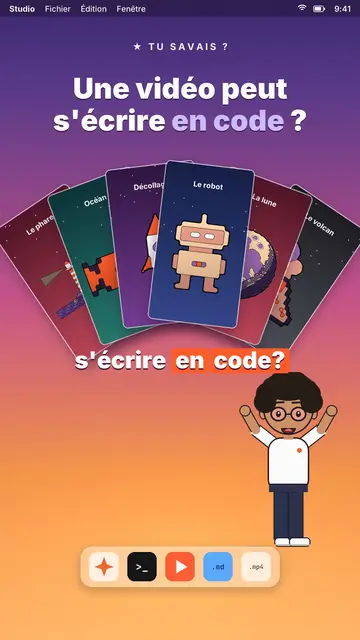
Slik ser denne stilen ut
Twilight desktop recreates a computer desktop, with its menu bar at the top and its dock at the bottom, set on a violet, pink and peach sunset gradient. Dark windows swing open in 3D on the spoken word: a terminal typing its commands, a code editor, a recap window, a statistic. Vertical videos spread out in a fan or a grid, and a counter climbs to the announced number.
At the bottom of the screen, a full-body avatar walks from one side to the other and presents, points or raises an arm. The big white title at the top carries one word in lavender, under a small mono kicker (“★ did you know?”). An orange tag pops under a window to say “written by AI”. The end can release an army of avatar clones, then a “Comment” card with a field that types itself and a “Subscribed” card.
Temaer den passer til
Avoid: topics far from the screen, like nature, history or sport: everything happens in a fake operating system. Also avoid emotional stories; the tone stays that of a demo.
- Coding and AI tutorialsThe terminal and the editor show the real command, line by line, as you say it.
- Tech “did you know?” clipsThe kicker and the lavender title ask the question, the swinging window gives the answer.
- Tool showcasesVideo cards in a fan show what the tool produces, without screenshots.
- Growth numbersThe counter climbing in its window makes a result concrete and measurable.
Videoideer i denne stilen
- A video can be written in code
Video cards in a fan, the editor filling up and the “written by AI” tag.
- Automate a task in 3 commands
The terminal typing each command, the recap and the avatar giving a thumbs up.
- How many hours AI saved me
The stats window, the climbing counter and the grid of finished tasks.
- Make 100 videos from one script
The video grid filling up and the clone army at the end.
Få det på 1 klikk
- Åpne lenken til denne stilen
Knappen «Lag en video i denne stilen» åpner editoren med denne stilen allerede valgt. Uten konto tar registrering ett minutt og krever ikke kort.
- Skriv emnet ditt i én setning
En idé er nok. Du kan også lime inn teksten din, eller, med Starter, fortelle inn i mikrofonen: videoen bygger da på stemmen din.
- Gjennomgå, så render
AI skriver scenene, velger elementene i stilen og tidsetter dem etter ordene, med stemme og undertekster. Du retter det som er feil, og så er den vertikale MP4-filen klar om noen minutter.
Det du kan justere
For each scene you pick the kicker, the title and its lavender word, the window that opens on the word (terminal, code, recap, stat, video cards or a library element), the orange tag, and the avatar's side and pose. The last scene carries the word to comment.
Ofte stilte spørsmål
Gratis eller ikke, resultat, bruk: kort forklart.
Is the code shown real?
It is the text you write in the script: commands, code lines, results. The engine types it into the window; nothing is executed.
Kan jeg bruke min egen stemme?
Yes. Record yourself or import your audio: windows open and the terminal types on your words.
How is it different from Clean interface?
Clean interface plays the story in light windows with a clicking cursor. Twilight desktop sets dark windows swinging in 3D over a sunset, with a walking avatar.
Er denne stilen med i gratisplanen?
Nei, det følger med Starter ($29/måned): 15 videoer uten vannmerke i måneden, alle 81 stiler pluss dine egne. Gratisplanen gir 3 videoer i måneden med vannmerke i 8 andre stiler: Pixel News, Press paper, Comedy cartoon, Class sketch, Night tale, Social screen, Retro synthwave og Flat vector.
Hvis du liker denne stilen

UI motion design explainer video
Clean interface style · The story played out in clean interface cards: windows, buttons, a cursor clicking on the word, key word in serif.
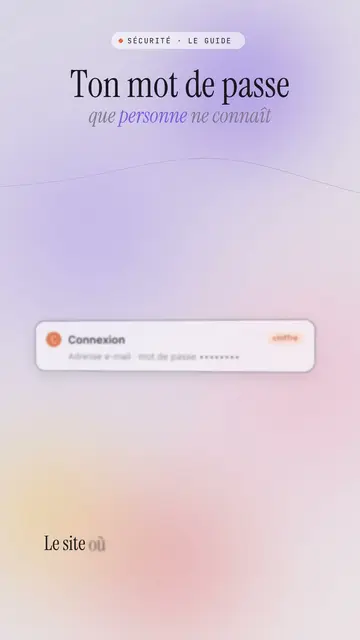
Glassmorphism tech video
Lavender frosted glass style · Frosted glass UI cards rising and coming into focus on a lavender gradient with halos.
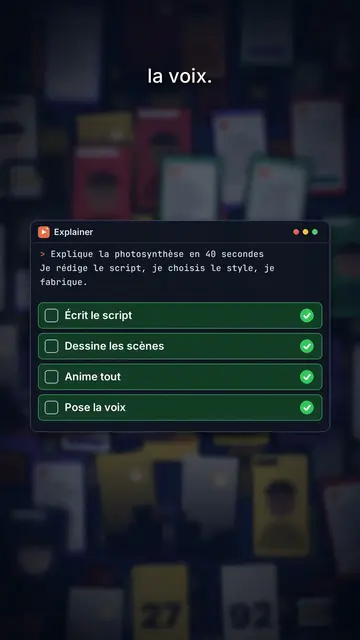
Content creator video
Thumbnail wall style · A midnight blue wall of video thumbnails in depth, a zoom through the wall, gold numbers.
Din idé, i denne stilen
Skriv en setning eller si den: stilen er allerede valgt når du kommer til editoren.